
How to Download a List of Canadian Registered Charities

If you need access to Canada's complete database of registered charities, the Canada Revenue Agency (CRA) makes it surprisingly easy. You can download a comprehensive list of all 85,000+ registered charities in under a minute, completely free. This guide walks you through the simple process and explains how to use the data effectively.
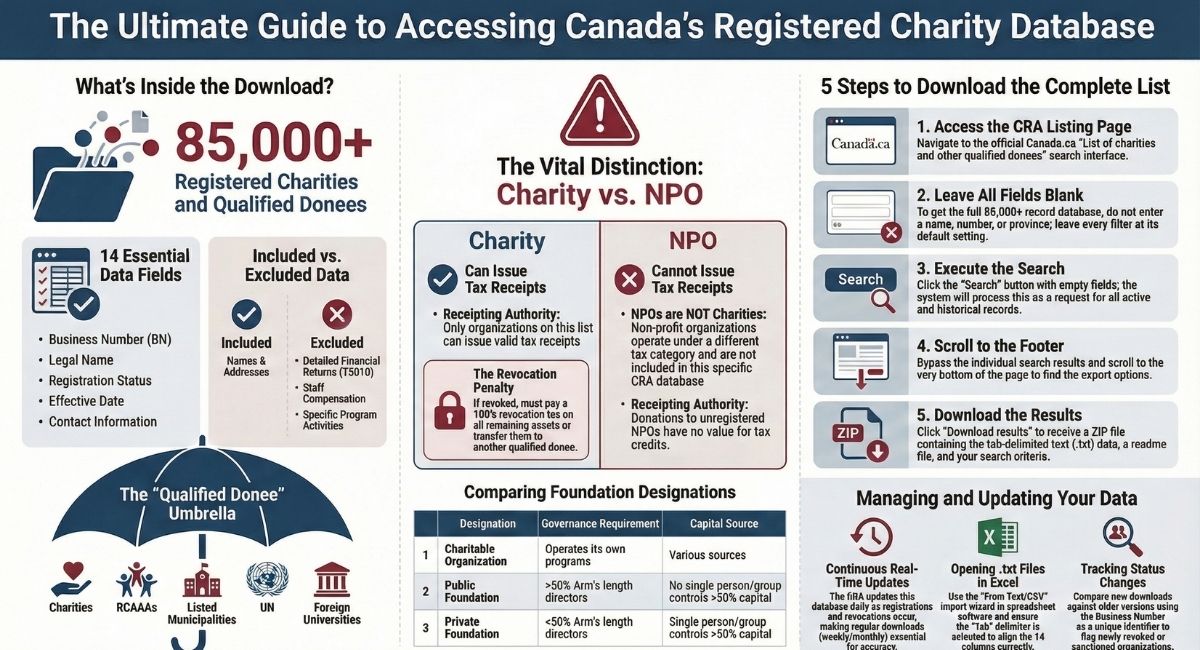
What Information the CRA Database Provides (And What It Doesn't)
The Canada Revenue Agency (CRA) provides a basic list showing all current registered charities. You can download this list from the CRA website for free.
What's Included in the Basic List:
Charity name Registration number Current registration status Whether the charity can issue official donation receipts
What's NOT Included:
The basic list does not have financial details or activity information. For more data, you need to look up each charity separately on the CRA's List of Charities website.
The CRA's main database has more details than the basic list. When you search for a specific charity, you can find directors' names, staff compensation, and some financial data.
The CRA provides access to T3010 (Registered Charity Information Return) data for the last ten years of information for each charity, not five years as previously stated.
Important Limitations:
The CRA database covers registered charities and other qualified donees, including:
- Registered Canadian Amateur Athletic Associations (RCAAAs)
- Listed municipalities performing a function of government in Canada
- Registered universities outside Canada
- The United Nations and its agencies
- National arts service organizations
The database does not include non-profit organizations (NPOs) that are not registered charities. It's important to understand that in Canada, NPOs and registered charities are legally distinct entities under the Income Tax Act. NPOs operate under paragraph 149(1)(l) of the Act and cannot issue official donation receipts. A non-profit organization is not simply a "type" of charity—it's a separate tax category entirely.
If you need to search for nonprofit organizations registered across Canada (both federally and provincially), you can access directories of Canadian companies and organizations at: https://www.canada.ca/en/services/business/research/directoriescanadiancompanies.html
This distinction matters for donors: Only organizations appearing on the CRA's registered charities list can issue valid donation receipts that allow you to claim a tax credit. If an organization is not on this list, any donation receipt they provide has no value for tax purposes, even if the organization calls itself a "charity" or operates for charitable purposes. Always verify an organization's registered charity status before making a donation if you want to claim a charitable tax credit.
The CRA list is useful to check if a group is currently registered. You can also see if a charity has been suspended or penalized.
For basic searches or to confirm a charity's status, the CRA database works well. For comparing multiple charities or accessing older data, you may need other tools.
Brief Overview of the Simple Download Process
You can download a complete list of Canadian registered charities directly from the CRA website. The process takes less than a minute once you know where to look.
The CRA maintains this list as part of their Charities Listings database. It includes all current registered charities in Canada.
What the download includes:
- Registration numbers
- Charity names
- Addresses and contact information
- Designation and category
- Effective date of status
- Email addresses and websites (when available)
You have two main options for getting the data. The first is downloading a basic list file that's already prepared. The second option involves requesting a custom data file through a CRA form.
The basic download is ideal if you:
- Need the complete list of all registered charities
- Want the data in a standard format
- Don't require specific filtering or customization
The file comes in tab-delimited text format (.txt). You can open it with spreadsheet programs like Microsoft Excel or Google Sheets.
Custom requests work better when you:
- Need specific data fields from charity tax returns
- Want information filtered by particular criteria
- Require data from certain years or time periods
Custom requests take longer to process. The CRA handles these on a first-come, first-served basis.
Most requests need at least six business days to complete.
What Information Is Included in the CRA Charities List?
The basic charities list from the CRA contains 14 key data fields to help you identify and verify registered charities. This file provides core organizational details but does not include financial data or program information.
Business Number (BN) and Registration Number
The BN/Registration Number is in the first field of the downloaded list. This unique nine-digit number, often followed by "RR" and four digits, is the official identifier for each registered charity in Canada.
You can use this number to verify a charity's legitimacy and search for more details. The registration number stays with the organization throughout its life as a registered charity.
This identifier appears on official donation receipts issued by the charity.
Organization Name and Legal Status
The organization name field shows the official registered name of the charity as recognized by the CRA. This may differ from the name the charity uses in public marketing.
The charity status field tells you if the organization is "Registered," "Revoked," or "Annulled." The effective date of status shows when the current status began.
You should only donate to charities showing "Registered" status if you want an official donation receipt for tax purposes. If a charity shows "Revoked" status, it has lost its registration and cannot legally issue donation receipts. Donations to revoked charities are not eligible for charitable tax credits.
Important: When a charity's registration is revoked, the organization faces serious consequences. It must either disperse all its remaining assets to other qualified donees or pay a revocation tax equal to 100% of the value of its assets. The CRA may also publish the names of directors and officers associated with revoked charities, which can impact their ability to serve on other charity boards.
Type of Qualified Donee
This field identifies what kind of qualified donee the organization is. The list focuses on registered charities but also includes other qualified donees that can issue donation receipts.
Not all qualified donees are registered charities. Some organizations can receive tax-deductible donations without being in the registered charities category.
Charity Designation and Category
The designation field shows whether a charity is a charitable organization, public foundation, or private foundation. Each designation has different rules about how the charity must operate and spend its funds.
The primary legal distinction between a public foundation and a private foundation in Canada is based on the arm's length relationship of the board and the source of capital. If more than 50% of the directors do not deal at arm's length with each other, or if one person or group contributes more than 50% of the capital and controls the charity, it is classified as a private foundation. Public foundations, by contrast, have boards where more than 50% of directors deal at arm's length, and no single person or group controls the organization through capital contribution.
Why designation matters for governance: Private foundations face stricter regulatory requirements than public foundations or charitable organizations. Private foundations must comply with additional rules regarding:
- Non-qualified investments: Private foundations face penalties if they hold investments that are not considered "qualified investments" under the Income Tax Act
- Dealings with directors: Private foundations must avoid certain financial transactions with directors, trustees, or persons who do not deal at arm's length with these individuals, or face penalties for engaging in prohibited transactions
These stricter rules exist because private foundations typically have concentrated control and funding sources, which creates higher risk for conflicts of interest or improper use of charitable assets.
The charity type and category fields provide additional classification details about the organization's primary area of charitable work.
Physical Address Details (City, Province, Postal Code)
The list includes address information for each registered charity. You'll find fields for street address, city, province, country, and postal code.
These address fields let you filter charities by location. For example, you can search for charities in a specific city or province.
The country field shows "Canada" for most entries but may show other countries for organizations operating outside Canada.
Sanction Information (If Applicable)
The sanction field indicates whether the CRA has imposed penalties or restrictions on the charity. Most charities will have this field blank, meaning they have no sanctions.
If a charity faces sanctions, this information appears in the list. Sanctions can include penalties for non-compliance with CRA requirements.
You should research any sanctioned charity carefully before making a donation.
What's NOT Included: Financial Information, T3010 Returns, Detailed Activities
The basic downloadable list doesn't contain financial data, program descriptions, or detailed activity information.
You won't find revenue figures, expense breakdowns, or information about what programs the charity runs.
To access financial information and detailed activities, you need to view individual charity profiles on the CRA website or access T3010 Registered Charity Information Returns.
The T3010 forms contain comprehensive financial statements, program descriptions, and compensation details for charity leadership.
The basic list serves as a quick reference to verify registration status and get contact information.
For research into a charity's finances or operations, you need to access the full charity profile through the CRA's individual charity search or use third-party databases that compile T3010 data.
Step-By-Step: How to Download the Complete Charity List
The Canada Revenue Agency maintains a searchable database of all registered charities that you can download for free.
You can either download the complete list at once or filter the results to get specific types of organizations based on location, designation, or registration status.
Getting the Full Database (All 85,000+ Charities)
The CRA database contains information on every registered charity in Canada.
This includes basic details like registration numbers, legal names, addresses, phone numbers, and email addresses when available.
The full database does not include detailed financial information or T3010 forms.
You can download the entire list without creating an account or logging in.
The process takes less than a minute once you know where to click.
Navigate to the CRA Charities Listing Page
Go to the Canada Revenue Agency website and search for "List of charities" or visit the direct URL.
The page title will say "List of charities and other qualified donees."
You will see a search interface with multiple fields.
This is where you would normally enter search criteria, but you will leave everything blank for the full download.
The page loads quickly on most internet connections.
Make sure you are on the official canada.ca domain to ensure you are accessing the correct government database.
Leave All Search Fields Blank
Do not enter any information in the search boxes.
Leave the charity name field empty and skip the registration number field.
Do not select any options from the dropdown menus for designation, charity type, or province.
The default settings should show "All" or blank fields.
This step is important because entering any criteria will limit your download to only those matching charities.
You want the complete database, so every field must remain empty.
Click "Search" Without Entering Criteria
Look for the blue "Search" button near the search fields and click it, even though you have not entered any information.
The system will process your blank search as a request for all records.
This might take 10 to 30 seconds depending on the CRA server load.
You will see a message indicating how many results were found.
This number should be around 85,000 or higher, representing all registered charities in the database.
Scroll to Bottom of Results Page
The results page will load showing individual charity entries.
Do not try to view each entry.
Instead, scroll all the way down to the bottom of the page.
You will pass by many charity listings as you scroll.
The page might take a moment to fully load all the navigation elements at the bottom.
Look for the download options located in the lower section of the results area.
This is separate from the individual charity links displayed in the main results.
Click "Download Results" Button
You will find a button or link labelled "Download results" or "Download search results" near the bottom of the page.
Click this button once.
The download will start automatically in most browsers.
You do not need to fill out any forms or provide contact information for the basic list download.
The file format is tab-delimited text (TXT).
The download usually completes within seconds since it is a text file.
Access the Tab-Delimited File from Your Downloads Folder
Check your computer's Downloads folder for the file.
The filename will include the date and indicate it is from the CRA charities database.
You can open this file with Microsoft Excel, Google Sheets, or any spreadsheet program.
The data will be organized into columns with headers like registration number, legal name, city, and province.
If the file opens in a text editor by default, you can right-click it and choose "Open with" to select your preferred spreadsheet program.
The tab-delimited format will automatically separate the data into proper columns in most spreadsheet applications.
Downloading a Filtered List (By City, Province, or Charity Type)
Filtered downloads work better when you need specific types of charities rather than the full database.
This saves time sorting through thousands of irrelevant entries.
The same download process applies, but you fill in search criteria before clicking the "Search" button.
You can combine multiple filters to narrow your results even further.
Filtered lists are smaller files that open faster.
They are easier to work with in spreadsheet programs when you only need data for a specific region or charity category.
How to Filter by Location (Example: Toronto Charities Only)
Start at the CRA List of charities search page.
Look for the location fields which include city and province dropdown menus.
To find Toronto charities, select "Ontario" from the province dropdown menu.
Then type "Toronto" in the city field if available, or filter the downloaded results by city after getting all Ontario charities.
The city field might not always be available as a search filter.
In this case, download all Ontario charities first, then use your spreadsheet program to filter by Toronto in the city column.
After setting your location filters, click "Search" and then follow the same download process.
Your file will now contain only charities located in your specified city or province.
How to Filter by Charity Type or Designation
The CRA classifies charities into different categories and designations.
The main designation types are charitable organization, public foundation, and private foundation.
Look for the "Designation" dropdown menu on the search page.
Select the type you want from the list of options.
Leave other fields blank if you want all charities of that designation regardless of location.
You can also filter by category codes if that option appears on the search form.
These codes represent the charity's primary area of work, such as religion, health, or education.
Click "Search" after selecting your designation filter.
The results will show only charities matching that classification.
Download the results using the same button at the bottom of the page.
How to Filter by Status (Registered vs. Revoked)
The status filter lets you see only currently registered charities or those that have been revoked.
This is useful for verifying if a charity is still legally allowed to issue donation receipts.
Find the "Charity status" dropdown menu on the search page.
The options typically include "Registered," "Revoked," "Annulled," and "All."
Select "Registered" to download only active charities that can currently issue official donation receipts for tax purposes. This is the most important filter for donors who want to ensure their donations are eligible for charitable tax credits.
Choose "Revoked" if you need historical data on charities that lost their registration.
Critical Warning: Revoked charities cannot legally accept donations as a registered charity or provide official donation receipts. Any donation receipt issued by a revoked charity has no value for tax purposes. Additionally, when the CRA revokes a charity's registration, the organization must either transfer all remaining assets to other qualified donees or pay a revocation tax equal to 100% of its assets' value. The consequences of revocation are severe and permanent.
Combining Multiple Filters for Targeted Results
You can use several filters at the same time for very specific searches.
For example, you might want only registered public foundations in British Columbia.
Fill in multiple fields before clicking "Search" to combine filters and narrow your results.
Understanding Your Downloaded File
Once you download the complete list of Canadian registered charities from the Canada Revenue Agency, you'll receive a compressed ZIP file containing multiple documents with charity data in a specific format.
The files use tab-delimited text formatting and include essential documentation to help you understand and use the charity information.
File Format and Structure
The charity data comes in a ZIP file that you need to extract before use.
Inside, you'll find plain text files rather than standard spreadsheet formats.
The main data file uses tab-delimited formatting, which means each piece of information is separated by a tab character rather than commas or spaces.
This format allows the CRA to include lengthy charity names, addresses, and descriptions without formatting errors.
Tab-delimited files work with most spreadsheet and database programs, making them versatile for different uses.
Tab-Delimited Text File Explanation
A tab-delimited text file stores data in rows and columns using invisible tab characters as separators.
Each line represents one charity record, and tabs divide the different data fields like registration number, charity name, and city.
You won't see the tab characters when you open the file in a text editor.
They appear as spaces between data points.
When you import the file into Excel or Google Sheets, the software recognizes these tabs and automatically places each field into separate columns.
The Three Files You'll Receive: Results, readme.txt, criteria.txt
Your download includes three distinct files.
The results file contains the actual charity data with all the registration information you requested.
This is the primary file you'll work with for analysis or importing into your systems.
The readme.txt file provides documentation about the data structure and field definitions.
The criteria.txt file shows the search parameters used to generate your results.
If you downloaded the complete list, this file confirms you selected all charities with no filters applied.
Understanding the 14 Data Fields
Each charity record contains 14 fields of information.
The Registration Number is a unique nine-digit identifier (BN) assigned to each charity.
The Charity Name field shows the official registered name.
City, Province, and Designation indicate the charity's location and legal category.
The Charity Status field tells you if the organization is currently registered or revoked.
The Effective Date shows when the current status began.
Sanction indicates if the charity faces any compliance penalties.
Additional fields include Language of Correspondence, Category (such as welfare or religion), and contact information like postal codes.
Some fields may be blank if the charity hasn't provided that information to the CRA.
How to Open and Use the Data
You can open tab-delimited files with any text editor to view the raw data.
However, this format is difficult to read without proper column alignment.
Most users import the data into spreadsheet or database software for easier viewing and analysis.
Save the extracted file to a location you'll remember.
Keep the readme.txt and criteria.txt files in the same folder for reference.
Make a backup copy of the original file before making any changes or modifications.
Importing into Excel or Google Sheets
In Excel, open a new workbook and select "Data" from the menu bar, then choose "From Text/CSV."
Navigate to your downloaded file and select it.
Excel will display an import wizard showing a preview of your data.
Verify that Excel detected the tab delimiter correctly.
The preview should show data properly separated into columns.
Click "Load" to import the complete dataset.
The first row typically contains field headers that label each column.
In Google Sheets, create a new spreadsheet and select "File," then "Import."
Upload your file and choose "Tab" as the separator type.
Select whether to create a new spreadsheet or insert the data into the current sheet.
Importing into Database Software
Database programs like Microsoft Access, MySQL, or PostgreSQL can import tab-delimited files directly.
In Access, create a new database and select "External Data," then "Text File."
Follow the import wizard and specify that the file uses tab delimiters.
For SQL databases, you'll use an IMPORT command with specific parameters for tab-delimited format.
Most database management tools provide graphical interfaces that simplify this process.
Set the appropriate data types for each field—text for names and addresses, numbers for registration numbers, and dates for effective dates.
Database storage provides advantages for large datasets.
You can run complex queries, create relationships with other data, and generate custom reports.
Using the Data in CRM Systems or Apps
Many customer relationship management systems and nonprofit software platforms allow data imports.
Export or save the tab-delimited file as a CSV (comma-separated values) file if your CRM doesn't support tab-delimited format.
Most spreadsheet programs offer this as a save option.
Map the 14 CRA fields to corresponding fields in your CRM during import.
Match Registration Number to your organization ID field, Charity Name to the organization name field, and so on.
Your CRM may have specific import templates or field mapping tools to streamline this process.
Test the import with a small sample of records first.
Verify that all data imported correctly before uploading the complete list.
Best Practices for Data Organization
Create a dedicated folder structure for your charity data. Store original downloaded files separate from modified versions.
Include the download date in your folder name, such as "CRA_Charities_2026-01-25." Add a version number to any files you modify or clean.
Document any changes you make to the data in a separate text file. This helps you track what alterations occurred and why.
Filter out revoked charities if you only need active organizations. Sort the data alphabetically by charity name or group by province for easier navigation.
Remove duplicate entries if they appear, though the CRA list usually contains unique records. Consider splitting very large datasets into smaller files organized by province or category.
This makes the data more manageable and improves performance in spreadsheet programs.
Keeping Your List Current: Update Strategies
The CRA database changes regularly as new charities register and existing ones change status. You need a system to keep your downloaded list accurate and up-to-date.
How Often the CRA Database Updates
The CRA updates its charities database continuously throughout each business day. Changes appear in real-time as the agency processes registrations, revocations, and status modifications.
You won't see batch updates at specific times. The database reflects changes as they happen during regular business hours.
The list you download today could be different from one downloaded tomorrow. New charities might appear, while others could show revoked or annulled status.
Setting Up a Regular Download Schedule (Weekly or Monthly)
Download a fresh list at least once per month for most purposes. This frequency catches the majority of changes without creating excessive data management work.
Weekly downloads work better if you need current information for donor receipting systems or fundraising platforms. You'll catch status changes faster and avoid issues with recently revoked charities.
Monthly downloads are sufficient for general reference, research projects, or mailing list maintenance. This schedule balances accuracy with the time needed to process updates.
Set a calendar reminder for the same day each week or month. Download the file using the same search criteria you used initially to ensure consistency.
Tracking Changes in Charity Status
Compare your new download against the previous version to identify changes. Sort both files by registration number in a spreadsheet program to line them up properly.
Look for these key changes:
- Status shifts from "Registered" to "Revoked" or "Annulled"
- New sanction designations
- Address or contact information updates
- Changes in charity type or category
Use spreadsheet functions to highlight differences between files. Create a column that flags when a registration number appears in one file but not the other, or when status fields don't match.
Keep archived copies of your downloads with dates in the filename. This creates a history you can reference when questions arise about when a charity's status changed.
Monitoring New Registrations and Revocations
New registrations appear in the database with an "Effective date of status" that shows when they received charitable status. Filter your downloaded list by this date to see recent additions.
Revocations are equally important to track. These charities can no longer issue official donation receipts, and donations to them aren't eligible for tax credits. When a charity's registration is revoked, it faces serious legal and financial consequences, including the requirement to either transfer all remaining assets to other qualified donees or pay a 100% revocation tax on its assets.
Download the complete list without filters to capture all changes. If you only search for specific cities or regions, you'll miss organizations that moved or changed their address information.
The CRA also maintains a sanctions list that shows charities under penalty. Check the "Sanction" field in your downloads to identify these organizations before engaging with them.
Troubleshooting Common Issues
When downloading charity lists from the Canada Revenue Agency, you may encounter technical problems or unexpected results. These issues often involve search timeouts, file errors, missing charities, date confusion, or duplicate entries in your downloaded data.
Search Timing Out with Large Results
The CRA's List of Charities database may time out if you try to download too many records at once. This happens most often when you search without filters and attempt to retrieve all 86,000 registered charities in a single request.
Break your search into smaller chunks by using filters. Select a specific province or territory from the dropdown menu to reduce the number of results.
You can also filter by charity designation or type to create more manageable data sets. If timeouts continue, try downloading data for different registration date ranges.
Use the effective date of status field to split your search into yearly or quarterly segments. For example, download all charities registered between 2020/01/01 and 2020/12/31, then repeat for other years.
File Won't Open or Appears Corrupted
Downloaded files may fail to open if your browser interrupted the download or if you're using incompatible software. Check that the file downloaded completely by comparing its size to what you expected.
Try opening the file with different programs. Tab-delimited files work with Excel, Google Sheets, and text editors like Notepad.
If Excel shows garbled text, the file encoding may be the issue. Save the file again and ensure you're using the correct file extension.
Sometimes browsers add extra extensions or save files incorrectly. Right-click the downloaded file and check its properties to verify the file type matches what you requested from the CRA database.
Missing Charities You Know Are Registered
If you can't find a specific charity, you might be using a different name than the one registered with the CRA. Many organizations use shortened names or acronyms in daily operations but register under their full legal name.
Check the charity status dropdown menu and change it from "Registered" to other options. The charity may have been revoked, annulled, or suspended.
You can also select "All" to see charities regardless of their current status. Contact the organization directly to get their nine-digit business number (BN) and four-digit RR reference number.
Search using these numbers instead of the name. This method eliminates confusion about spelling or naming variations.
Understanding "Effective Date of Status" Discrepancies
The effective date of status shows when a charity's current status began, not when it first registered. This confuses people who expect to see the original registration date.
A charity marked as "Registered" with an effective date of status of 2023/06/15 means that's when it received or renewed its registered status. The charity may have existed for years before this date.
Check the charity's full record for its complete history. When you filter by effective date of status, you get charities that entered that status on or after your selected date.
If you enter 2020/01/01 and select "Registered," you'll see charities that became registered from that date forward, not all charities that existed at that time.
Dealing with Duplicate Entries
Duplicate entries appear when charities change their registration status or when multiple downloads are combined. The same organization may show up with different status dates or reference numbers.
Sort your downloaded file by the business number (BN) column. This groups all entries for the same charity together.
You can then identify and remove duplicates while keeping the most recent record for each organization.
Use spreadsheet functions to remove duplicates automatically. In Excel, select your data and use the "Remove Duplicates" tool under the Data tab.
Choose the BN column as your unique identifier. This ensures you're only removing true duplicates and not different charities with similar names.
Beyond the Basic List: Additional CRA Resources
The basic charity list gives you names and registration numbers. The CRA also offers detailed information through search tools and downloadable financial returns.
You can access complete charity profiles, download annual information returns, and use advanced filters to find what you need.
Accessing Detailed Charity Information Pages
The CRA's Charities Listings search tool lets you view complete profiles for any registered charity in Canada. When you search for a specific charity, you can see its contact information, registration status, and general activities.
Each charity page shows whether the organization is currently registered, revoked, annulled, penalized, or suspended. You'll also find the charity's business number, mailing address, and fiscal period end date.
The financial section displays revenue, expenditures, and assets from the charity's most recent filing. This data helps you see how the organization manages its money and what percentage goes to charitable programs versus administration.
Downloading T3010 Charity Information Returns
The T3010 Registered Charity Information Return contains the most detailed financial and operational data for Canadian charities. Every registered charity must file this return annually with the CRA.
You can download individual T3010 returns directly from a charity's profile page on the CRA website. The return includes revenue sources, expenditures, compensation for directors and employees, and program descriptions.
For bulk data analysis, the CRA publishes complete datasets on the Open Government Portal. These CSV files include financial data, charitable programs, compensation schedules, and international activities.
The datasets are updated regularly and include information from thousands of charities across Canada.
Using the Advanced Search Features Effectively
The CRA's charity search tool includes filters to help you narrow down results. You can search by charity name, registration number, city, or designation type.
The designation filter is useful. Public foundations have boards where more than 50% of directors deal at arm's length, and no single person or group controls the organization through capital contribution.
Private foundations, by contrast, have more than 50% of directors who do not deal at arm's length with each other, or have one person or group that contributes more than 50% of the capital and controls the charity.
Charitable organizations directly operate programs rather than just making grants. You can also filter by city to find local charities in your area.
The search results show basic information. You can click any charity to view its full profile.
Charity Listings API Options (If Available)
The CRA currently provides charity data through downloadable CSV files instead of a real-time API. These files are available on the Open Government Portal and include multiple datasets covering different aspects of charity operations.
The datasets include identification files, financial data, director information, and program details. You can download these CSV files and import them into your own database or application.
Software developers can download the complete dataset and refresh it periodically. The CRA updates these files regularly, though the exact refresh schedule varies.
Conclusion
You now have the tools to download a complete list of Canadian registered charities quickly and easily. The Canada Revenue Agency provides free access to this data through their List of Charities database.
You can search for individual charities or download the entire list in a file format that works for your needs. This information helps you verify charity status, research the charitable sector, or ensure compliance with tax regulations.
The data includes registration numbers, contact details, financial information, and charity activities. You can use these downloads for due diligence, research projects, or donor education purposes.
If you need legal guidance on charity registration, compliance matters, or any other aspect of Canadian charity law, contact B.I.G. Charity Law Group for professional support. Our team provides expert advice to registered charities and nonprofit organizations across Canada.
You can reach us by email at dov.goldberg@charitylawgroup.ca or call 416-488-5888 to discuss your situation. Visit CharityLawGroup.ca to learn more about our services, or schedule a FREE consultation to speak with our experienced charity law professionals.
Frequently Asked Questions
The Canada Revenue Agency maintains the official registry of all charities in Canada. You can access this information for free through their website and download the complete list in multiple formats.
How to look up a registered charity in Canada?
You can search for a registered charity using the Canada Revenue Agency's List of Charities database. This searchable tool lets you confirm if a charity is registered, revoked, annulled, penalized, or suspended.
The database shows each charity's contact information, general activities, and financial details. You can also view the public portions of their annual information returns.
Can I obtain a full list of charities registered in Canada without cost?
Yes, you can download a complete list of all current Canadian registered charities from the CRA website at no cost. The basic list includes all registered charities but does not contain detailed financial information or activity reports.
This free download is useful if you need to verify registration status or want to incorporate a list of registered charities into software or applications.
What formats are available for downloading the registry of Canadian charities?
The CRA provides the charity registry as a downloadable file that includes a text file with the list of search results. Your download will also include a readme.txt file that explains each field in the results and a criteria.txt file that shows the search criteria you used.
The file package includes the date and time stamp showing when you downloaded it.
How often is the list of registered charities in Canada updated and how can I access the latest version?
The CRA updates the List of Charities regularly as charities file their T3010 Registered Charity Information Returns. Every registered charity in Canada must file this annual return, which updates their information in the database.
You can access the most current version by visiting the CRA's Charities Directorate website and downloading a fresh copy. Each download is timestamped so you know exactly when the data was current.
Are there any restrictions on using the data from the Canadian charity registry?
The List of Charities contains public information that charities are required to disclose under the Income Tax Act. This includes financial information, activities, and details about directors and similar officials.
You can use this public data for verification, research, or integration into applications and databases. The information is provided by the CRA for public access and transparency.
Where can I find instructions for using the Canadian registered charity list after downloading it?
The download package includes a readme.txt file. This file explains the content of each field in the results file.
This documentation helps you understand what each column or data point means.
If you have questions about using the data, you can contact the CRA at the email address in the download materials.
The CRA's Charities Directorate website also offers resources and guidance for working with charity data.
Legal Sources & References
- CRA - Issuing receipts
- CRA - RC4106 Registered Charities: Operating a Registered Charity
- CRA - How to get information about a charity
- CRA - CG-024, Types of registered charities (Designations)
- CRA - List of municipal or public bodies performing a function of government in Canada
The material provided on this website is for information purposes only.. You should not act or abstain from acting based upon such information without first consulting a Charity Lawyer. We do not warrant the accuracy or completeness of any information on this site. E-mail contact with anyone at B.I.G. Charity Law Group Professional Corporation is not intended to create, and receipt will not constitute, a solicitor-client relationship. Solicitor client relationship will only be created after we have reviewed your case or particulars, decided to accept your case and entered into a written retainer agreement or retainer letter with you.
Similar Topics
View More..
.png)


